Notebook Parameters (Parametric Sweep from the Command Line)
A step-by-step tutorial for notebook parameters in code_saturne: named
values declared in the GUI, usable in any MEG formula, and overridable from the
command line with --notebook-args. One setup.xml then drives a whole
parametric study without ever editing the case. Here the inlet velocity of a
laminar channel is a parameter, swept over three values, and each run is
verified against the analytic Poiseuille solution.
Maintained by Simvia, part of the tutoriel-code_saturne collection.
Learning objectives
After completing this tutorial you will be able to:
- Declare a notebook parameter in the GUI (name, default value, editable flag).
- Use it by name inside any MEG formula (boundary conditions, initialization, properties).
- Override it from the command line with
code_saturne run --notebook-args name=value. - Organize a parametric sweep with named result directories (
--id). - Verify each run of the sweep against the analytic Poiseuille solution.
Prerequisites
| Requirement | Detail |
|---|---|
| code_saturne | v9.1 |
| Background | Basic notions of laminar channel flow |
If code_saturne is not yet installed, build it from the official homepage, pull a ready-to-use Singularity image from the Open Simulation Center, or pull the Simvia Docker image before continuing.
Case files
Inc_Notebook_Parameters/
├── CASE/
│   └── DATA/
│       └── setup.xml     # pre-configured GUI case (holds the notebook parameter)
├── FIGURES/              # figures used in this README
└── README.md
There is no mesh file: the channel grid is built by code_saturne's internal
Cartesian mesher, directly from setup.xml.
Physical model
The flow is laminar and incompressible in a plane channel; each run is marched to steady state with local pseudo-time stepping. Once developed, the solution is the plane Poiseuille flow:
which gives an exact reference for every value of the swept inlet velocity \(U\).
Flow parameters
| Parameter | Value | Unit | Source |
|---|---|---|---|
| Density \(\rho\) | 900 | \(\mathrm{kg\,m^{-3}}\) | setup.xml: density |
| Dynamic viscosity \(\mu\) | 0.09 | \(\mathrm{Pa\,s}\) | setup.xml: molecular_viscosity |
Inlet velocity u_in |
0.1 / 0.25 / 0.5 | \(\mathrm{m\,s^{-1}}\) | notebook parameter (default 0.25) |
| Reynolds number \(Re_{D_h}\) | 40 to 200 | - | derived (\(D_h=2H\)) |
At the highest velocity the development length is \(L_{\mathrm{dev}}\approx0.05\,Re_{D_h}\,D_h\approx0.4\ \mathrm{m}<L\): the outlet region is fully developed for every value of the sweep.
The notebook parameter (the feature)
The parameter is declared in the GUI (Physical properties, Notebook), which
stores in setup.xml:
<notebook>
  <var name="u_in" value="0.25" editable="Yes"
       description="inlet bulk velocity [m/s]"/>
</notebook>
and is then available by name in every MEG formula of the case. Here it drives both the inlet velocity and the initialization:
u_norm = u_in;              /* inlet boundary condition  */
velocity[0] = u_in;         /* initialization            */
The editable="Yes" flag allows the value to be overridden at run time,
without touching setup.xml:
code_saturne run --notebook-args u_in=0.5 --id sweep_u0p5
--id names the result directory, which keeps the sweep tidy. Notebook
parameters can also be read from user C routines with
cs_notebook_parameter_value_by_name("u_in").
Geometry and boundary conditions
Plane channel, \(L=1\ \mathrm{m}\), \(H=0.02\ \mathrm{m}\), one cell thick in \(z\); built-in Cartesian mesh of \(100\times40\) cells, refined toward both walls (parabolic law).
| Boundary | Type | Condition |
|---|---|---|
inlet (\(x=0\)) |
Inlet | u_norm = u_in; (notebook parameter) |
outlet (\(x=L\)) |
Outlet | Standard outlet |
bottom_wall, top_wall |
Wall | No slip |
front / back |
Symmetry | Quasi-2D |
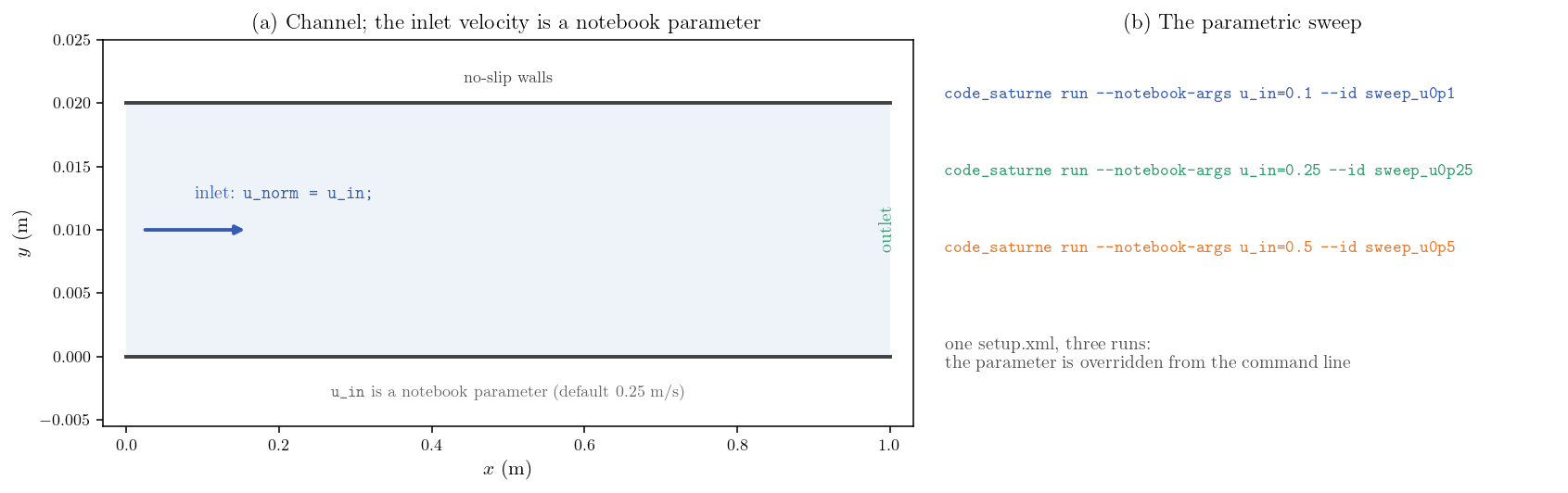
Figure 1: (a) Channel; the inlet velocity is the notebook parameter
u_in. (b) The sweep: one setup, three runs, the parameter
overridden from the command line.
Numerical setup
| Setting | Value |
|---|---|
| Steady strategy | Local (pseudo) time-stepping |
| Iterations | 800 |
| Velocity-pressure algorithm | SIMPLEC |
| Turbulence | Off (laminar) |
Running the simulation
From the tutorial directory:
Option A: Graphical interface
code_saturne gui CASE/DATA/setup.xml &
The parameter is visible under Physical properties, Notebook; run with the default value (0.25 m/s) using the Run button.
Option B: Command line (the sweep)
cd CASE

code_saturne run --n 4 --notebook-args u_in=0.1  --id sweep_u0p1
code_saturne run --n 4 --notebook-args u_in=0.25 --id sweep_u0p25
code_saturne run --n 4 --notebook-args u_in=0.5  --id sweep_u0p5
Each run creates its own named directory CASE/RESU/sweep_*/ with
run_solver.log and the EnSight fields used below.
Results and verification
Every run of the sweep is compared with the analytic Poiseuille solution at its
own value of u_in:
u_in (m/s) |
\(u_{\max}\) | \(1.5\,U\) | \(-\mathrm{d}p/\mathrm{d}x\) (Pa/m) | \(12\mu U/H^2\) | error |
|---|---|---|---|---|---|
| 0.10 | 0.1498 | 0.1500 | 269.6 | 270.0 | 0.15 % |
| 0.25 | 0.3744 | 0.3750 | 674.0 | 675.0 | 0.15 % |
| 0.50 | 0.7488 | 0.7500 | 1347.9 | 1350.0 | 0.15 % |
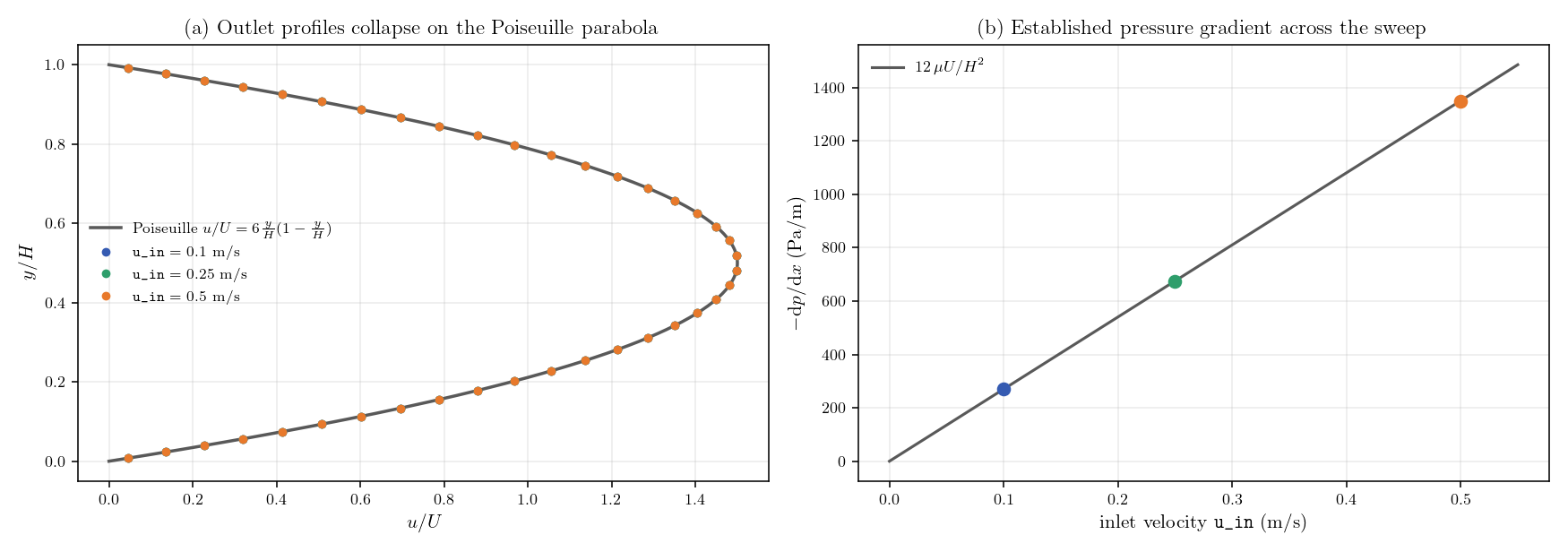
Figure 2: (a) The outlet profiles of the three runs, normalized by their
own u_in, collapse on the single Poiseuille parabola. (b) The
established pressure gradient of each run sits on the analytic line
$12\mu U/H^{2}$.
The three runs agree with the analytic solution to 0.15 percent (the
discretization error of the \(100\times40\) grid), confirming that the value
passed with --notebook-args is the one actually used by the solver.
Summary
This tutorial declared the inlet velocity of a laminar channel as a notebook
parameter, used it by name in the inlet and initialization formulas, and ran a
three-value parametric sweep from the command line with --notebook-args and
named result directories, without ever editing setup.xml. Each run matches the
analytic Poiseuille solution to 0.15 percent. Notebook parameters are the
lightest way to parameterize a code_saturne case (geometry-independent values,
boundary conditions, material properties) and plug naturally into scripts and
optimization loops.
References
- code_saturne documentation: https://code-saturne.org/doc/.
- F. M. White, Viscous Fluid Flow, McGraw-Hill.
Authors
Simvia - Questions, remarks and requests are welcome.