Reading a Meteo File: Atmospheric Flow from a Vertical Profile (atmo)
A step-by-step tutorial for the meteo-file workflow of the atmospheric flows
module (atmo) in code_saturne. Real atmospheric simulations are driven by
measured or forecast vertical profiles of wind, temperature and turbulence.
This tutorial shows how to provide such a profile in a meteo file, have
code_saturne ingest it, and use it to initialize the domain and drive the open
boundaries. The showcased feature is read_meteo_data: the atmospheric
preprocessor reads the profile and applies it automatically at the inlets.
Maintained by Simvia, part of the tutoriel-code_saturne collection.
Learning objectives
After completing this tutorial you will be able to:
- Write a meteo file in code_saturne's format (date, location, sea-level pressure, temperature profile, wind profile).
- Enable
read_meteo_datain the atmospheric (dry) model. - Impose the meteo profile at the open boundaries with a
CS_INLETwhose values are filled from the profile by the atmospheric module. - Check that the domain reproduces the ingested profile.
Prerequisites
| Requirement | Detail |
|---|---|
| code_saturne | v9.1 |
| Tutorials | Atmo_Neutral_BoundaryLayer (neutral surface layer, rough wall, log law) |
If code_saturne is not yet installed, build it from the official homepage, pull a ready-to-use Singularity image from the Open Simulation Center, or pull the Simvia Docker image before continuing.
Case files
Atmo_Meteo_Profile/
├── CASE/
│   ├── DATA/
│   │   ├── setup.xml                     # dry atmo model, read_meteo_data on, k-epsilon
│   │   └── meteo                         # the meteo file (wind + temperature profile)
│   └── SRC/
│       ├── cs_user_zones.cpp             # boundary zones (inlet/outlet/top/ground/sides)
│       ├── cs_user_boundary_conditions.cpp   # meteo inlet + rough wall (set in C)
│       └── cs_user_initialization.cpp    # initial fields from the profile
├── FIGURES/
└── README.md
No mesh file: the vertical slice is built by the built-in cartesian mesher.
Why are the boundary conditions in C? In code_saturne v9.1 the GUI's meteo-boundary path is not wired to the preprocessor, so the open boundaries are set in
cs_user_boundary_conditions.cpp: a face markedCS_INLETwith its velocity left unset is filled by the atmospheric module from the meteo profile (cs_atmo_bcond), interpolated at the face height.
Physical model
The atmo dry model transports the potential temperature with buoyancy and
hydrostatic pressure. The read_meteo_data option reads a vertical profile from
the meteo file and:
- initializes the whole domain by interpolating the profile in height, and
- imposes the profile at every open boundary marked as an inlet.
The meteo file format is a small fixed layout (comment lines start with /):
year, quantile(day), hour, minute, second
location x, y (m)
sea-level pressure (Pa)
temperature profile:  n levels, then  altitude(m)  T(degC)  humidity  droplets
wind profile:         n levels, then  altitude(m)  u(m/s)  v(m/s)  k(m2/s2)  eps(m2/s3)
Here the profile is a neutral atmosphere (uniform potential temperature \(15\)°C) with a logarithmic wind (\(u_* = 0.8\) m/s, \(z_0 = 0.1\) m) veering from the west, from \(\approx 3.4\) m/s near the ground to \(\approx 16\) m/s at \(500\) m.
Setup parameters
| Quantity | Value |
|---|---|
| Domain | \(1000 \times 500\) m (vertical slice) |
| Roughness length | \(z_0 = 0.1\) m |
| Atmosphere | dry, neutral (\(T = 15\)°C) |
| Turbulence | \(k\)-\(\varepsilon\) |
| Meteo file | 11-level wind and temperature profiles |
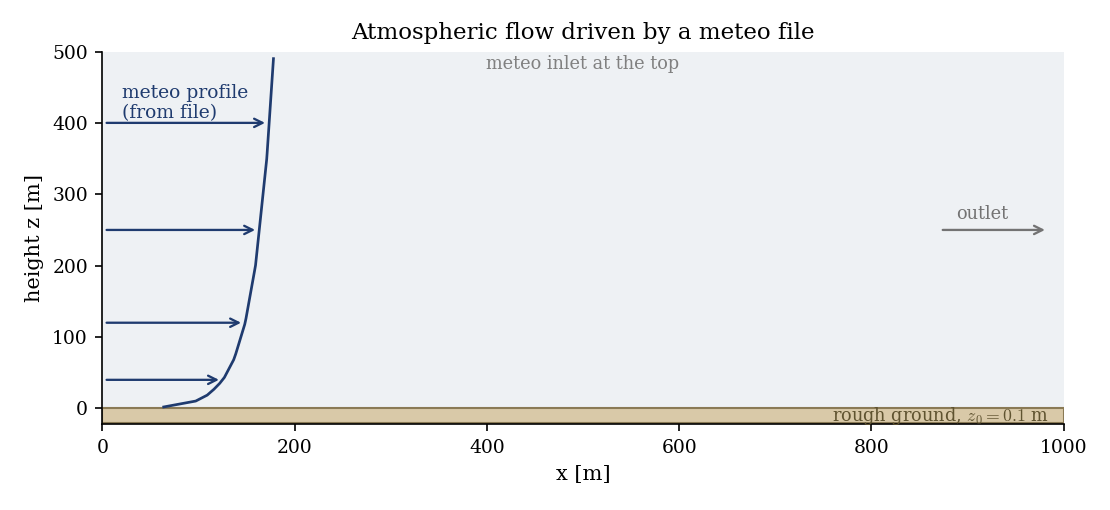
Figure 1: the meteo profile from the file is imposed at the west inlet and the top; the flow passes over the rough ground to the outlet.
Geometry and boundary conditions
Vertical slice, \(z\) the vertical. The west face and the top are inlets fed by the
meteo profile (CS_INLET, iautom = 1), the east face is an outlet, the ground
is a rough wall (\(z_0 = 0.1\) m, plus a thermal roughness), and the spanwise sides
are symmetry planes. All of this is set in cs_user_boundary_conditions.cpp.
Numerical setup
Dry atmospheric model with read_meteo_data on and the meteo file named meteo
in DATA/. The \(k\)-\(\varepsilon\) fields, the velocity and the potential
temperature are initialized from the profile in cs_user_initialization.cpp. The
run advances to a steady state (\(2000\) steps).
Running the simulation
cd CASE
code_saturne run --n 4
The mesh is generated internally and the meteo file is read at start-up (the log
prints Reading meteo profiles data). The run writes CASE/RESU/<id>/ with the
velocity, potential temperature and turbulence fields.
Results
The flow is horizontally homogeneous over the flat ground and simply carries the meteo profile across the domain: the wind increases smoothly with height from the ground to the top, following the ingested profile.
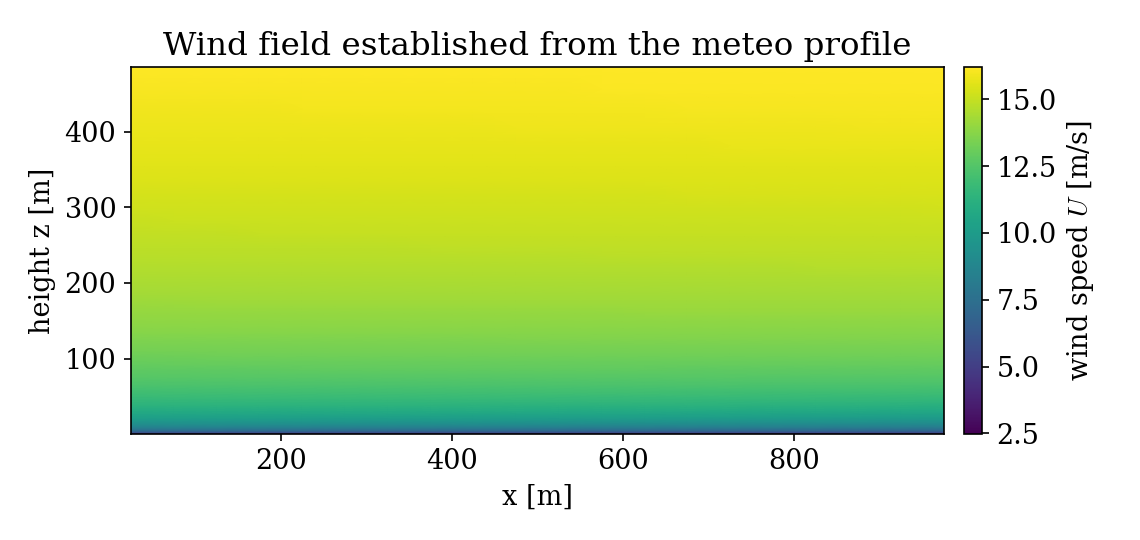
Figure 2: wind speed field. It grows with height as prescribed by the meteo file and stays uniform along the flow, as expected over flat terrain.
Extracting the vertical wind profile in the domain and comparing it with the meteo file confirms the ingestion: above the first few metres the domain profile lies on the meteo input to within one to two percent. The wall-adjacent cells sit slightly below, where the rough-wall law sets the near-ground gradient.
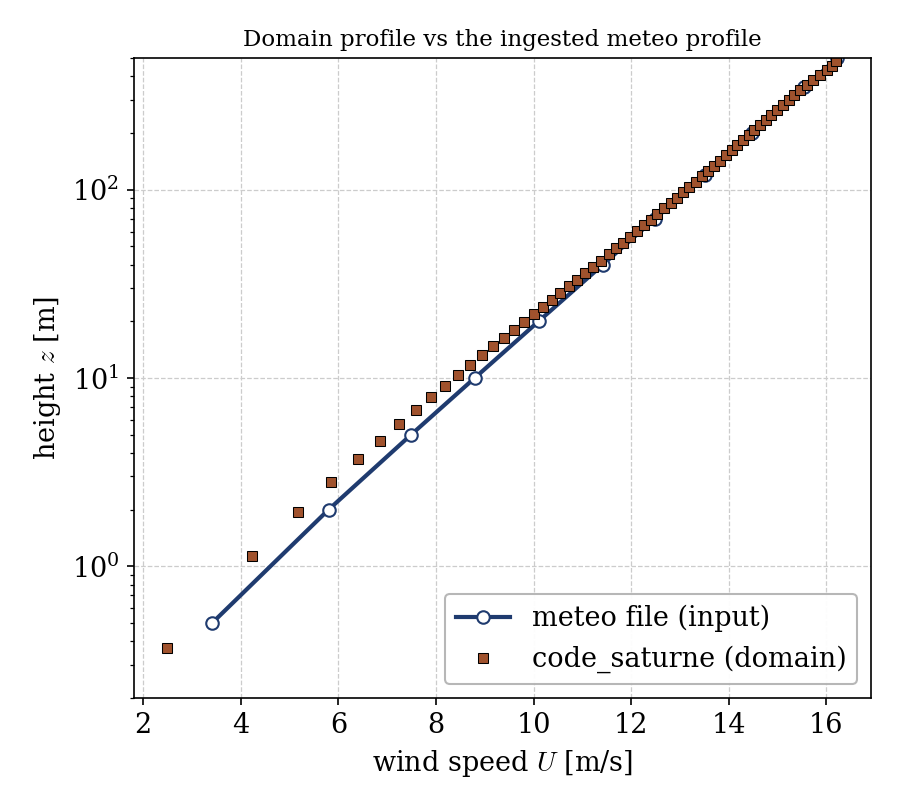
Figure 3: the domain wind profile (symbols) against the meteo file input (line with circles). The ingested profile is reproduced across the domain.
Summary
This tutorial fed code_saturne a meteo file: a vertical profile of wind,
temperature and turbulence, read at start-up by the atmospheric module and used
to initialize the domain and drive the inlets. The resulting flow reproduces the
prescribed profile over flat terrain. The lesson that carries beyond this case:
the meteo file is the entry point for real atmospheric simulations (measured
soundings, forecast profiles), and code_saturne ingests it through
read_meteo_data, applying it at inlets marked CS_INLET. Real terrain, several
time-stamped profiles, humidity or stratification are then natural extensions of
the same workflow.
References
- J. R. Garratt. The Atmospheric Boundary Layer, Cambridge University Press, 1992.
- code_saturne atmospheric flows documentation
Authors
Simvia. Questions, remarks and requests are welcome.