Zone Refinement (Local Mesh Subdivision)
A step-by-step tutorial for the local refinement operation of code_saturne: subdividing the cells of a selected region at run time, leaving the rest of the mesh untouched. This is the tool for meshes that are fine enough everywhere except where something sharp happens: a plume, a front, a wake corridor. Two cases are shipped, identical but for one file: the user routine that refines the corridor carrying a tracer band.
Like the boundary-layer insertion, this operation has no GUI page in this version: it lives in cs_user_mesh.cpp (the cs_user_mesh_modify function). Everything else in the case remains GUI-configured.
Maintained by Simvia, part of the tutoriel-code_saturne collection.
Learning objectives
After completing this tutorial you will be able to:
- Refine a selected cell zone from
cs_user_mesh_modify(cs_selector_get_cell_list+cs_mesh_refine_simple_selected). - Know what the operation produces: each selected hexahedron split into \(8\) children, and a conforming transition to the unrefined neighbourhood handled by the code.
- See what local resolution buys on a sharp feature: a tracer front kept at its physical thickness instead of being smeared by the coarse cells.
Prerequisites
| Requirement | Detail |
|---|---|
| code_saturne | v9.1 |
| Tutorial | Pre_Boundary_Layer (the cs_user_mesh_modify entry point) |
If code_saturne is not yet installed, build it from the official homepage, pull a ready-to-use Singularity image from the Open Simulation Center, or pull the Simvia Docker image before continuing.
Case files
Pre_Zone_Refinement/
├── CASE_Coarse/
│   └── DATA/setup.xml        # uniform 5 mm mesh, no SRC
├── CASE_Refined/
│   ├── DATA/setup.xml        # identical
│   └── SRC/cs_user_mesh.cpp  # THE difference: refine the tracer corridor
├── FIGURES/                  # figures used in this README
└── README.md
Built-in cartesian mesher, identical
setup.xml. The whole operation is the one routine.
The case
The support flow is deliberately trivial: a uniform stream (\(1\) m/s, symmetry on all lateral faces, so no wall effect at all) carrying a band of passive tracer (\(12.5\) mm wide, smooth edges) down a \(1\) m channel, with a small diffusivity (\(2 \times 10^{-6}\ \mathrm{m^2/s}\)). Physically, the band edges spread into fronts a few millimetres thick: about the size of the \(5\) mm cells of the base mesh, which therefore smears them numerically.
The routine refines the corridor containing the band (\(0.02 < y < 0.08\), all along the channel):
- the selection is an ordinary cell criteria (
box[...], the volume counterpart of what the previous tutorials did with faces); cs_mesh_refine_simple_selectedsplits each selected hexahedron into \(8\) children (\(5\) mm → \(2.5\) mm here), and theconformingflag lets the code build the transition cells at the corridor edge. The factor-of-two subdivision is built into the operation (there is no level argument): for deeper refinement, call the function again, redoing the cell selection between calls since the cell numbering changes;- the log reports the operation (
Mesh before refinement/Mesh after refinement), the mesh going from \(4\,000\) to \(24\,000\) cells.
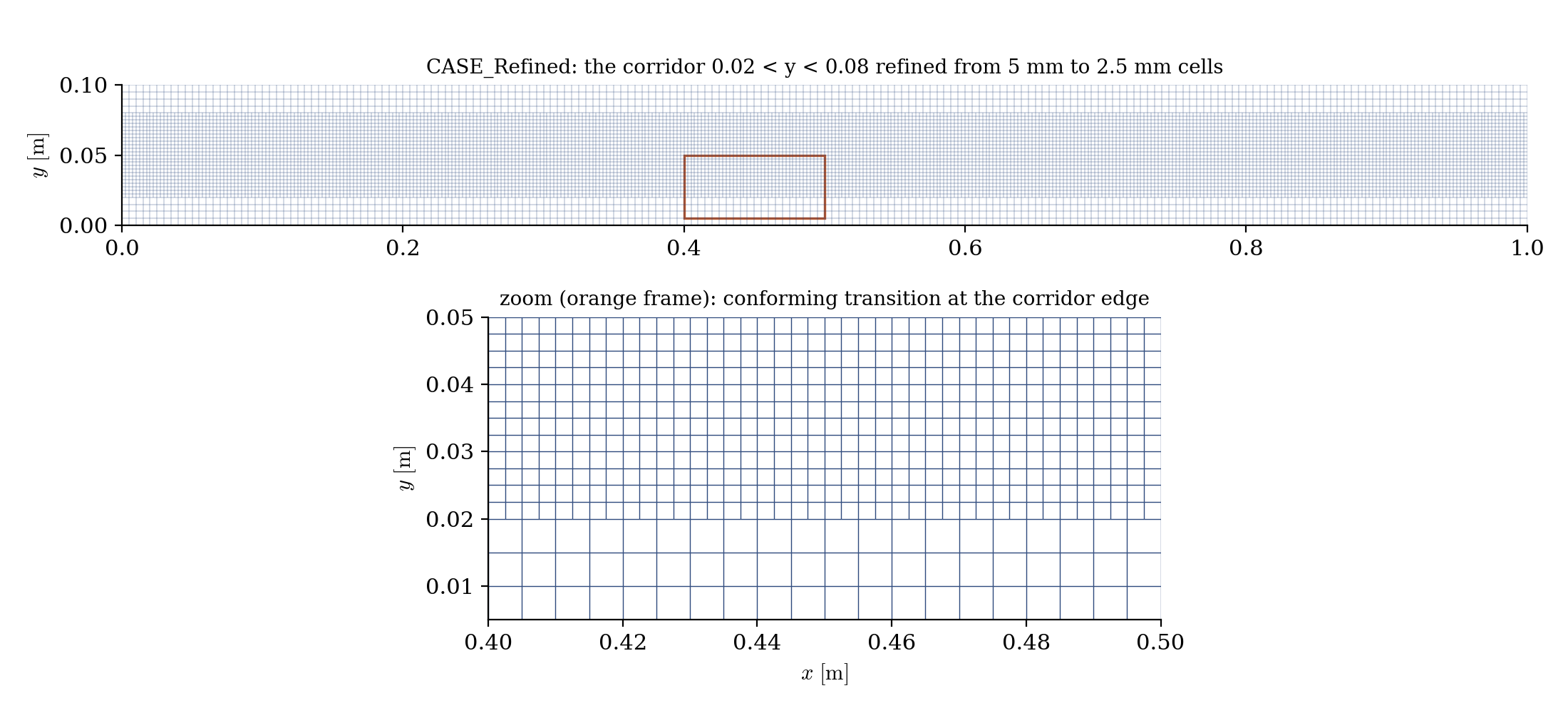
Figure 1: the refined corridor (top) and a close-up of its edge (bottom): the selected cells are subdivided, and the transition to the untouched cells below is built by the code.
Running the simulation
The commands below start from the tutorial directory:
cd Pre_Zone_Refinement/
Run both cases (GUI: open each setup.xml and use the Run button; the routine in SRC/ is compiled automatically):
cd CASE_Coarse
code_saturne run --id coarse

cd ../CASE_Refined
code_saturne run --id refined
Results
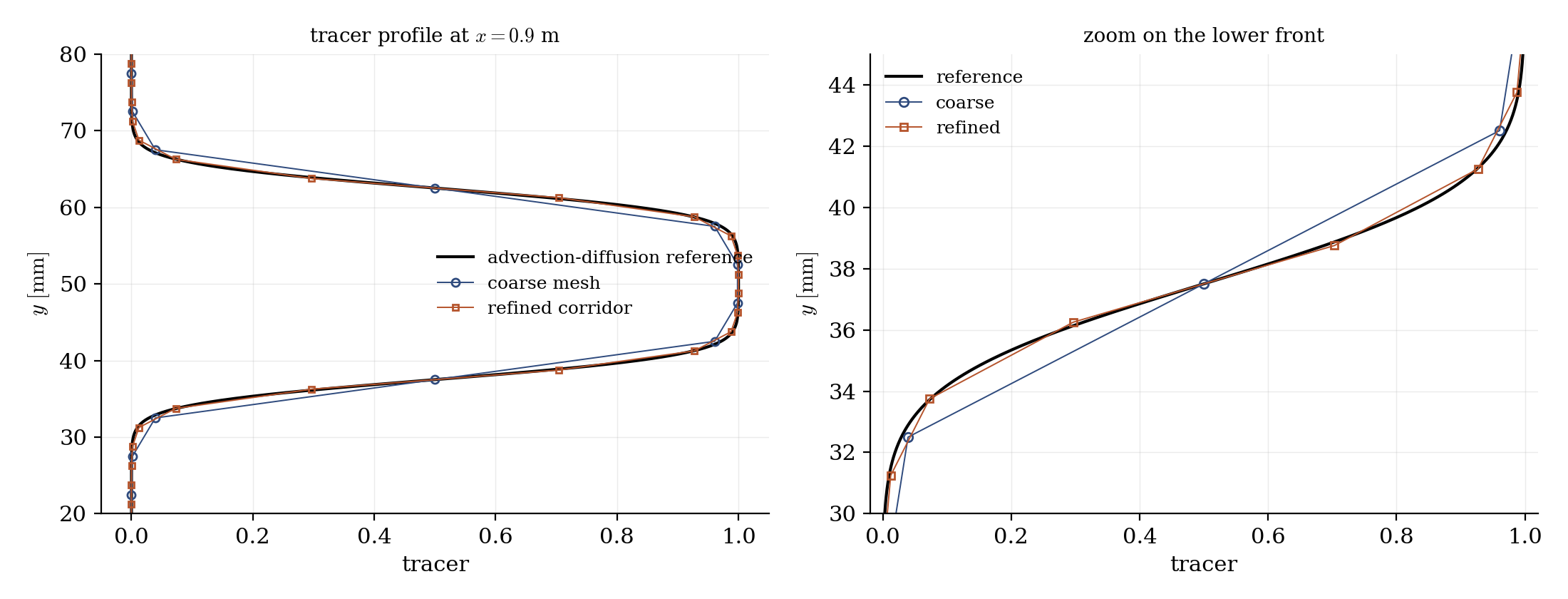
Figure 2: tracer profile near the outlet ($x = 0.9$ m), against the advection-diffusion reference (the inlet band diffused over the travel time). The refined corridor follows the reference through the fronts; the coarse mesh cuts the corners and widens them.
The effect is where it was expected: the \(10\)-\(90\%\) front thickness measures \(6.6\) mm on the reference, \(6.9\) mm in the refined corridor, and \(8.7\) mm on the coarse mesh, a third too wide. The band peak and the absence of undershoots are preserved in both cases; only the local resolution of the fronts changes, at the cost of refining \(60\%\) of the domain instead of all of it.
Summary
This tutorial refined a selected zone of an existing mesh at run time: one cs_user_mesh_modify routine selecting a cell box and calling cs_mesh_refine_simple_selected (no GUI page for this operation in this version). Each selected cell is split into \(8\), the conforming transition at the zone edge is handled by the code, and the log reports the operation. On a tracer band crossing the domain, the refined corridor keeps the fronts at their physical thickness where the coarse mesh widens them by a third.
References
Authors
Simvia - Questions, remarks and requests are welcome.